

The Command Line by Example
grep / sed / awk / sort by example, with real captured output
The numbers
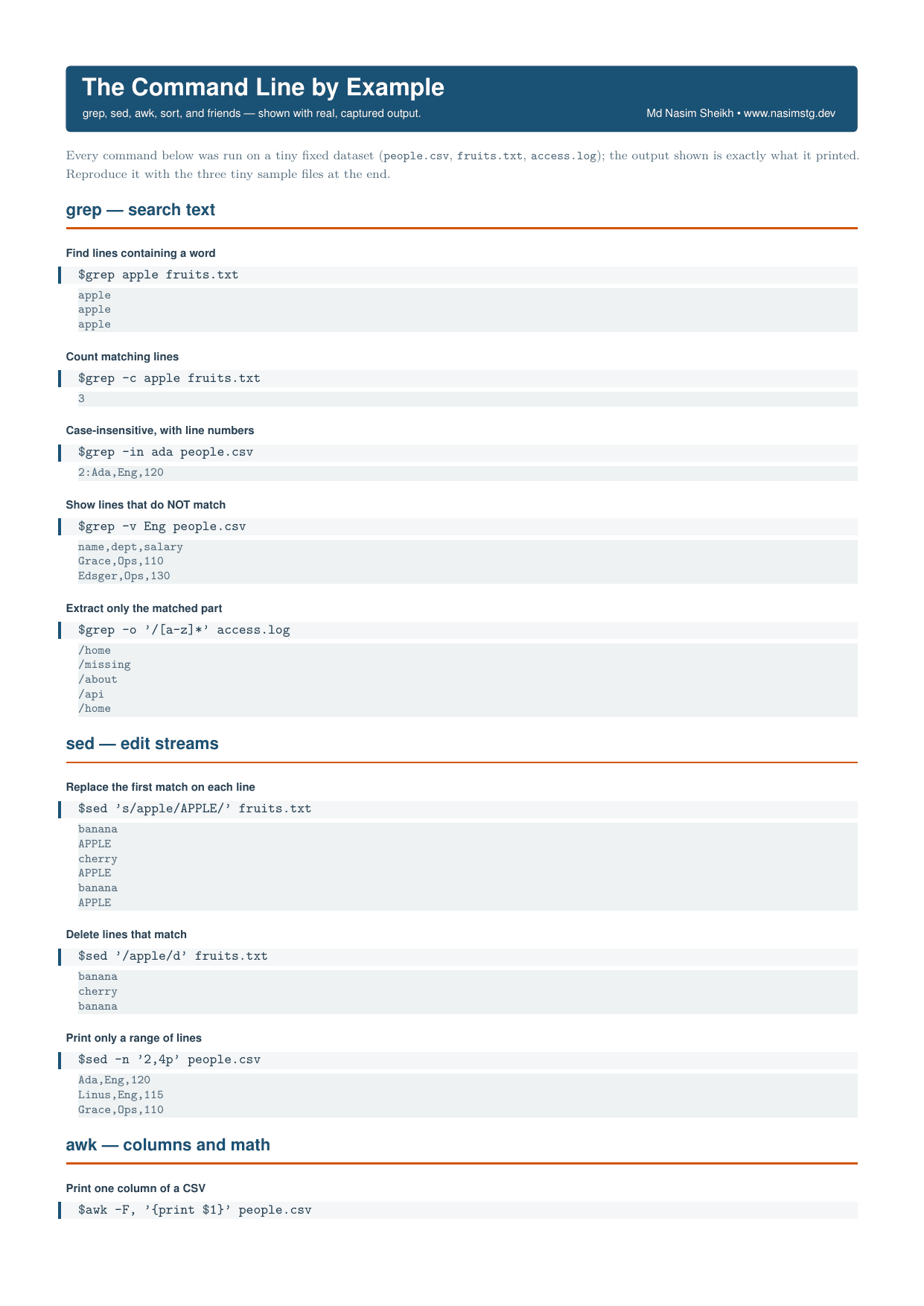
Every recipe pairs the task, the exact command, and exactly what it printed on a tiny fixed dataset, so nothing in it is invented or approximated.
25
recipes with real output
6
tools covered
1
sample dataset included
What's inside
- 25 recipes across grep, sed, awk, sort/uniq, cut/tr/wc, and find/xargs.
- Real captured output for every command, not invented examples.
- A tiny sample dataset included, so you can run every recipe yourself.
- Print-quality vector PDF that stays sharp beside your terminal.
Everything included
- grep: find lines containing a word - grep apple fruits.txt
- grep: count matching lines - grep -c apple fruits.txt
- grep: case-insensitive search with line numbers - grep -in ada people.csv
- grep: show lines that do NOT match - grep -v Eng people.csv
- grep: extract only the matched part - grep -o '/[a-z]*' access.log
- sed: replace the first match on each line - sed 's/apple/APPLE/' fruits.txt
- sed: delete lines that match - sed '/apple/d' fruits.txt
- sed: print only a range of lines - sed -n '2,4p' people.csv
- awk: print one column of a CSV - awk -F, '{print $1}' people.csv
- awk: sum a numeric column - awk -F, 'NR>1{s+=$3} END{print s}' people.csv
- awk: filter rows by a field - awk -F, '$2=="Eng"{print $1}' people.csv
- awk: count rows per group - awk -F, 'NR>1{c[$2]++} END{for(k in c) print k, c[k]}' people.csv
- sort: sort lines - sort fruits.txt
- sort/uniq: count each unique line - sort fruits.txt | uniq -c
- sort/uniq: most common first - sort fruits.txt | uniq -c | sort -rn
- sort: sort a CSV by a numeric column - sort -t, -k3 -n people.csv
- cut: keep only some fields - cut -d, -f1,3 people.csv
- wc: count lines, words, characters - wc people.csv
- tr: upper-case text - echo hello world | tr a-z A-Z
- tr: squeeze repeated characters - echo 'a,,,b,,c' | tr -s ,
- find: find files by name - find . -name '*.txt'
- find+xargs: count lines in each found file - find . -name '*.txt' | xargs wc -l
- head/tail: show first and last lines - head -2 people.csv; echo --; tail -2 people.csv
- nl: number the lines - nl fruits.txt
- column: line up columns - column -t -s, people.csv
- Sample file: people.csv (name,dept,salary rows for Ada, Linus, Grace, Dennis, Edsger)
- Sample file: fruits.txt (banana, apple, cherry list)
- Sample file: access.log (status GET/POST path lines)
- POSIX / GNU coreutils on Linux; BSD/macOS flags differ slightly
Frequently asked
Is this really free?
Yes. The sheet is a standalone one-page reference by Md Nasim Sheikh (www.nasimstg.dev) with no purchase or paywall content anywhere in the document. It's a single self-contained cheat sheet, not a sample chapter of something paid.
What format is it in?
It's built from LaTeX (article class, 10pt, A4 with 1.5cm margins, pagestyle empty) into a single printable page, laid out as a title band followed by grouped command/output blocks. In short, a one-page PDF cheat sheet you print or keep open while working in a terminal.
Is there a paid version with more?
Nothing in the document references a paid tier, bundle, or extended edition. It's presented purely as a self-contained reference covering grep, sed, awk, sort/uniq, cut/tr/wc, and find/xargs/head/tail/nl/column, each shown with real captured output from three tiny sample files included at the end.
Do I need anything special to reproduce the outputs myself?
No, just a POSIX/GNU coreutils environment (the footer notes it was run on Linux and that BSD/macOS flags differ slightly). Copy the three sample files given at the end of the sheet (people.csv, fruits.txt, access.log) and every command shown will reproduce the exact printed output.